I was using Claude Code this morning and asked it to suggest a few repository names. Instead of just listing them in text, it gave me this:
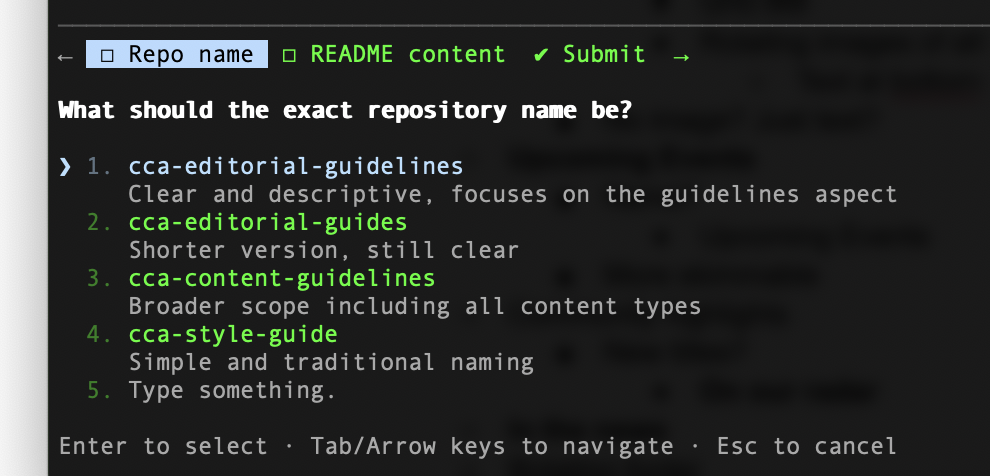
An interactive prompt! Right in the terminal, with numbered options, descriptions, and keyboard navigation instructions.
This is such thoughtful UX for a CLI tool. It makes the interaction feel polished and actually fun to use. Small touches like this make all the difference.
And Then It Happened Again
But here's where it gets interesting. Ten minutes later, while working on this very blog post, I told Claude to add the screenshot to the post. And instead of just doing it, Claude prompted me again:
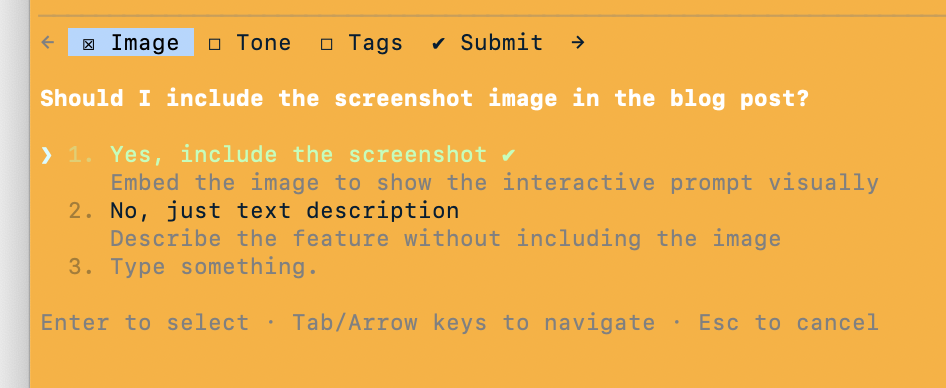
Same feature, same delightful UI—but this time asking if I wanted to include the image in the post.
Wait. I just asked you to include the image. Why are you asking me if I want to include the image?
My reaction was completely different. Not "wow, this is cool!" but "this feels redundant and kind of weird."
Finding the Balance
It's fascinating how quickly a feature can go from delightful discovery to potential friction. The first time felt like a pleasant surprise. The second time felt... redundant.
And maybe that's the key difference: the first prompt was asking for new input I hadn't given. The second was asking me to confirm something I'd already explicitly requested. That's not helpful interactivity—that's friction.
This isn't a criticism—it's just an interesting UX challenge. When do you prompt for input versus making a smart default? And more importantly, when should you skip the prompt entirely because the user already told you what to do?
I don't know the answer. Maybe the first prompt (choosing repo names) deserved the interactive treatment because it's genuinely hard to auto-select from multiple good options. But the second one? If I say "add the image," maybe just... add the image.
Or maybe I just need more time with the feature to appreciate when it shows up.
(Oh, and one more thing: the "Type something" option doesn't support vim keybindings, so hitting Esc cancels the entire prompt instead of exiting insert mode. That's... particularly annoying for vim users.)
Actually, I just hit an even more frustrating issue. Or did I? I was mid-sentence in one buffer when my interactions with Claude completely stopped—not crashed, just unresponsive. Turns out there was an interactive prompt waiting in another buffer, and it was blocking all interactions everywhere until I answered it.
That's a real problem for multi-buffer workflows. But here's the thing: I can't replicate it now. Maybe it was a bug, maybe I'm misremembering. Live blogging/QAing, I guess!
Either way, it'll be interesting to see where Anthropic lands on this balance. Too few prompts and you miss chances for user input. Too many and you're breaking flow.
For now, I'm still impressed by the execution even if I'm curious about the strategy.